A homelab can run perfectly for months.
Then you leave the country.
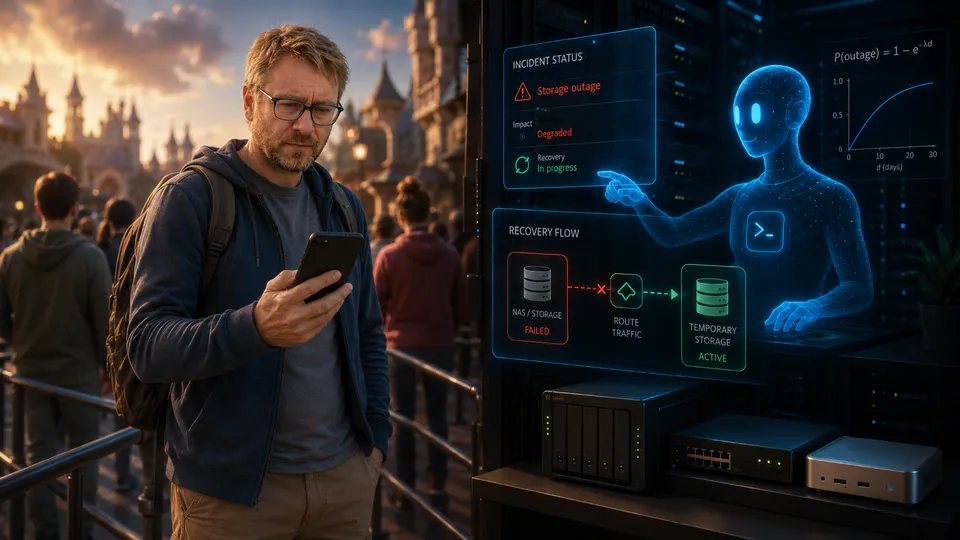
On the second day of a family holiday at Disneyland Paris, I received an alert about a major power cut at home. Some equipment was protected by UPS units, some was not, and several important parts of the network had disappeared.
I was standing in the queue for Peter Pan’s Flight.
This was entirely predictable. My colleagues and I have long suspected that homelab reliability falls as the administrator’s distance from the rack increases.
I propose calling this the Homelab Holiday Heuristic:
P(outage) = 1 − e^(−λd)
Where d is the administrator’s distance from the rack, and λ is the homelab’s inherent chaos coefficient.
For my homelab, λ is clearly not trivial.
The unusual part was not that something failed while I was away. It was what I did next.
I gave an AI agent SSH access and asked it to handle the incident.
Is it still a homelab if someone else manages it?
Before this, I had been cautious about allowing an AI agent to make meaningful changes to my infrastructure.
Letting it read logs and suggest commands was one thing. Giving it SSH keys and allowing it to operate across several machines was another.
There was also a slightly philosophical concern.
Is it still a homelab if someone else manages it for you?
Part of the appeal is learning how systems work. You design the network, deploy services, break things, then work out how to fix them. Handing operational control to an AI agent can feel like outsourcing the reason for having a homelab in the first place.
That concern felt much less important after 45 minutes in the Peter Pan queue.
The choice was not really between managing the incident myself and delegating it. Diagnosing a multi-machine failure from my phone, while on holiday with my family, was not a serious option.
The real choice was between letting the agent act and leaving the infrastructure broken until I returned home.
So I gave it the keys.
What had failed
My homelab is built around a small Proxmox cluster and runs a mix of home and personal infrastructure:
- Home Assistant and MQTT
- a reverse proxy and Cloudflare Tunnel
- a NAS
- camera recording
- media services
- AI tooling
- a broadcast recording and transcription pipeline
The power cut had left the environment in an awkward partial state.
One Proxmox node was still running on UPS power. Several services had survived with it, including the broadcast harvester, transcription service and TVHeadend.
Other machines had gone down, including two Proxmox nodes and the NAS.
This was more complicated than a simple list of online and offline machines.
The broadcast harvester process was still running, but it depended on storage from the NAS. Its SMB mount was stale, recordings could no longer be written, and broadcasts were becoming stuck in the application database.
Home Assistant was down, which also meant MQTT was unavailable.
The reverse proxy was offline, removing external access to several services.
The cameras still had power, but their NVR was not recording because it ran as a virtual machine on the NAS.
Everything depended on something else.
First, work out what still exists
The agent started by mapping the surviving network.
It did not rely only on ping, which was blocked or unreliable in some places. Instead, it used TCP connections to known ports to see which hosts and services were still responding.
It then inspected applications, logs, mounts and process state.
That distinction mattered.
A running process does not mean the service is healthy.
The harvester processes had been running for several days, but their logs showed failed MQTT connections and errors accessing the recordings directory. The application was alive. The wider pipeline was not.
Within a few minutes, the agent had split the environment into three groups:
- systems that had survived;
- systems that might be recoverable remotely;
- systems that probably needed physical intervention.
The NAS appeared to be in the final group. Everything else was still uncertain.
Building a temporary route around the failure
The most urgent problem was storage.
TVHeadend was still available and could continue finding programmes to record, but the NAS share it normally wrote to no longer existed.
The surviving Proxmox node had spare local disk space, so the agent used it as temporary recording storage.
It created a local directory, exported it over NFS, and made it available to both the broadcast harvester and the TVHeadend machine.
The normal path looked roughly like this:
TVHeadend → NAS storage → Harvester → TranscriptionDuring the outage, the agent changed it to:
TVHeadend → Temporary NFS storage → Harvester → TranscriptionThat looks simple in a diagram, but it crossed several systems.
The agent had to:
- create and export the replacement storage;
- remove stale SMB mounts;
- mount the temporary storage in the correct places;
- allow access across two network segments;
- update persistent mount configuration;
- restart the affected container;
- clear broadcasts that had become stuck;
- confirm that new recordings could be written and processed.
There was also a safety check in the Proxmox container configuration.
I had previously added a startup hook that refused to start the harvester unless its recording path was backed by a CIFS mount. This was meant to stop the container quietly writing large recordings to the wrong local filesystem if the NAS mount failed.
The agent recognised that this was a deliberate safeguard, not a random error. It changed the check to accept the temporary storage instead of simply removing it.
That detail mattered.
Good incident response is not about deleting anything that stops a service from starting. It should understand why a protection exists and preserve its purpose where possible.
The surviving Proxmox node had another problem. The three-node cluster had lost quorum because the other two nodes were offline.
The agent temporarily changed the expected vote count so the remaining node could operate alone. It then restarted the harvester and checked the full recording chain.
Around 20 minutes after the pipeline had become stuck, it was running again on temporary local storage.
Waking the rest of the cluster
With the most time-sensitive service restored, the agent moved on to the failed machines.
It searched available ARP caches and network information for the MAC addresses needed to send Wake-on-LAN packets.
Some addresses were still available. Others had aged out, so I supplied two that I had recorded elsewhere.
The first Wake-on-LAN attempt failed.
The tool had chosen a default network interface that did not exist on the Proxmox host.
The agent found the problem, selected the correct Linux bridge and tried again.
This time, both missing Proxmox nodes returned.
Their configured virtual machines then began starting automatically.
That restored:
- full Proxmox cluster quorum;
- Home Assistant;
- MQTT;
- the reverse proxy;
- the Cloudflare Tunnel;
- several dependent services.
The agent did not rebuild each service manually. It understood that recovering the hosts would allow the existing startup configuration to do most of the work.
The NAS did not return.
Several Wake-on-LAN attempts produced no response. It probably had Wake-on-LAN disabled in firmware, did not support it through its current NIC configuration, or needed someone to press the power button.
That left one machine genuinely beyond remote recovery.
Unfortunately, several other services lived inside it.
A second incident hidden inside the first
The NAS failure also meant the camera NVR was offline.
The cameras remained powered because their PoE switch was connected to a UPS. I could still view them through the manufacturer’s mobile app, but nothing was being recorded.
That created a second problem.
A power cut should not normally require building an emergency video recorder, but infrastructure incidents tend to expose dependencies that did not seem important until they vanished.
The agent found another machine with enough free storage and direct network access to the cameras.
It then:
- identified the cameras’ RTSP streams;
- tested the credentials;
- checked the available video and audio formats;
- started background FFmpeg processes;
- copied the video streams without re-encoding;
- split the recordings into timestamped segments;
- confirmed that the files were growing correctly.
This was not a full replacement for the normal NVR.
There was no object detection, motion classification or normal retention policy. It was simply continuous, low-resolution recording to cover the gap until the NAS returned.
But it was enough.
That is often what incident response needs. You do not rebuild the ideal system. You create a safe degraded mode.
The most important output was not the repair
Once the immediate services were stable, the agent documented every change it had made.
This included:
- temporary storage paths;
- changed mounts;
- NFS configuration;
- changes to startup checks;
- stopped services;
- temporary camera recording processes;
- cluster quorum changes;
- the steps needed to restore the normal setup.
It also produced a recovery runbook for when the NAS was physically powered back on.
That mattered because a temporary fix can easily become a second incident.
Without a clear record, I could have returned home to a working but confusing environment full of temporary mounts, altered configuration and recordings spread across several machines.
The agent’s work was reversible.
More than any individual command, that was what made the intervention credible.
Autonomous remediation without a rollback plan is just automated improvisation.
It still needed me
The agent did not have perfect knowledge.
It asked for information when it could not discover it safely:
- missing MAC addresses;
- access details after an API login failed;
- camera credentials that were not stored in its available documentation.
It also made one incorrect assumption.
Its infrastructure notes described the camera NVR as a physical machine. In reality, it was a virtual machine hosted on the NAS.
When I corrected it, the agent updated its documentation and persistent knowledge.
This showed one of the limits of infrastructure agents.
They are only as reliable as the information available to them.
An agent can inspect a live system, but it still benefits greatly from accurate documentation covering:
- where services run;
- what depends on what;
- how systems should normally start;
- which changes are considered safe;
- where secrets and credentials are stored;
- how temporary changes should be reversed.
Giving an AI agent access to poorly documented infrastructure does not remove uncertainty. It only allows that uncertainty to move faster.
The security question
Giving an AI agent SSH access to infrastructure is clearly not risk-free.
That was why I had resisted it.
A capable agent with privileged access can make mistakes at machine speed. It can misunderstand an instruction, rely on incorrect documentation, or make a technically valid change that causes problems elsewhere.
The answer is not to pretend those risks do not exist. It is to treat the agent like any other privileged operator.
That means considering:
- restricted SSH keys;
- separate service accounts;
- network segmentation;
- logged sessions and commands;
- limits on destructive operations;
- backups and snapshots;
- minimal access to secrets;
- explicit approval for high-risk actions;
- clear rollback procedures;
- a quick way to revoke access.
My setup did not implement all of those ideas perfectly.
The decision was made during a real outage, while I was several hundred miles away and trying to stay present on a family holiday.
That is not usually where ideal security architectures are designed.
But the incident changed how I thought about the risk.
Before the outage, I saw AI access to my infrastructure as a new danger that had to be justified.
Afterwards, I also saw the lack of capable remote automation as a risk.
A homelab that only one person can understand or operate has a bus factor of one.
It also has a holiday factor of one.
From assistant to operator
The most interesting part was not that the agent knew how to configure NFS, send Wake-on-LAN packets or run FFmpeg.
I could have done each of those things myself.
The value was in connecting them.
It inspected several machines, followed dependencies across the network, read logs and configuration, tested ideas, recovered from a failed attempt, changed the environment, and documented the final state.
It kept the context of the whole incident.
That is closer to operational work than command generation.
Before this, I had mostly treated AI as an adviser for the homelab. It could help diagnose errors, explain commands or review configuration.
After this incident, it had earned a permanent role as an operator.
That does not mean it owns the infrastructure or makes every decision.
I still design the systems. I decide what runs, which risks are acceptable, and what access the agent receives. I remain responsible for the result.
But I am no longer the only entity capable of operating it.
So, is it still my homelab?
I think it is.
A homelab does not stop being yours because you automate parts of it.
Nobody argues that Ansible, Kubernetes, monitoring, self-healing services or scheduled jobs make a homelab less legitimate. An AI agent is a more flexible and less predictable form of automation, but the underlying question is similar.
The value of a homelab has never depended on every action being performed manually.
The value lies in building, understanding and controlling the system.
The agent did not replace that ownership. It extended my reach when I could not be there.
By the end of the incident, it had:
- assessed the outage;
- identified failed dependencies;
- built temporary storage;
- restored the recording pipeline;
- recovered two cluster nodes;
- restored quorum and external access;
- brought back Home Assistant and MQTT;
- created emergency camera recording;
- stopped a service that kept hitting a dead mount;
- documented every temporary change;
- produced a full rollback plan.
The only unresolved task was pressing the physical power button on the NAS.
Physical access remains undefeated.
Still, by the time I reached the front of the Peter Pan queue, most of the homelab was running again.
The Homelab Holiday Heuristic still holds.
The difference is that being away from the rack no longer means being unable to operate it.